Table of Contents
Does This Sound Familiar?
You want ChatGPT, Claude, or Gemini to read through a meeting record, an invoice, or a contract and help you summarize or proofread it. But the document contains things you're not thrilled about sending to an AI as-is — a client's company name, a contact person's name, amounts, phone numbers, email addresses.
Large companies can afford to build a closed, secure in-house AI environment, but for small businesses and sole proprietors, that level of security investment just isn't realistic. And it feels like a waste to conclude "AI looks useful, but I can't risk a data leak, so I can't use it for work."
To solve exactly that problem, I built a free Windows desktop tool called "AI Secret Guard: Kanamei-kun." This post introduces it.
· Free to use
· No installation — a single exe file, ready to go
· Everything before you send data to AI runs completely locally (no internet connection)
· Supports Office files (Word, Excel, PowerPoint)
What This Tool Does — and Doesn't Do
To be upfront: this tool does not send anything directly to an AI. It's purely a helper for "prepping your document before you paste it into an AI."
Here's the flow:
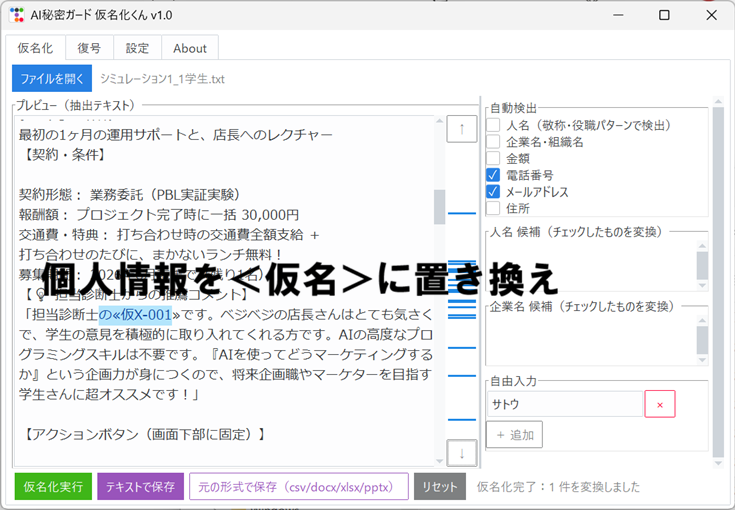
- Open your document in this tool and replace sensitive information with placeholder tokens (e.g. «Mask-N-001») — this is "masking"
- Copy the masked text yourself and paste it into ChatGPT or another AI's chat window
- Copy the AI's reply (which still contains the placeholder tokens) and paste it back into this tool
- The tool restores the placeholders to the original information — this is "unmasking"
In other words, you still handle the actual conversation with the AI exactly as before. This tool only takes over the tedious "hide the sensitive parts" and "put them back" steps on either side of it.
Biggest Strength: Tedious Prep Work, Done Locally, in Seconds
This tool's single biggest strength is that the prep work before you hand anything to an AI happens entirely on your own PC, with zero internet connection, and takes almost no effort.
There's no browser extension to install, no cloud service to sign up for, no Python environment to set up. No installation step either — you just launch a single exe file, and masking and unmasking are just a matter of checking some boxes and clicking a button. I designed it so that a small business or sole proprietor with no dedicated security staff could start using it today, without having to write any new internal rules.
I also made sure that "the same original word always maps to the same placeholder," so the context of the document doesn't get scrambled and the AI's answer quality doesn't suffer.
Main Features
The "Mask" Tab
Open a txt, csv, docx, xlsx, or pptx file, and the tool reads the text inside and checks it for sensitive information (names, company names, amounts, phone numbers, email addresses, addresses) — or you can type in your own keywords to mask. The preview highlights matches in color, so you can see at a glance what's being converted.
※ Word, Excel, and PowerPoint support is for "reading the text content" only. The masked output is always saved as plain text (.txt), and that's also what you paste into the AI.
Basic PDF reading is supported too, but since PDF internal structure varies wildly from file to file, text extraction can fail on PDFs with complex layouts. If you're working with a PDF, always check the preview of the converted result before using it.
The "Unmask" Tab
Paste in the AI's reply and restore the placeholders to the original information. As a bonus, it can also open already-masked docx/xlsx/pptx files and unmask them while preserving the original file format and formatting.
Fully Local
It never connects to the internet, so there's no risk of what you type being sent anywhere externally.
How to Use It
- Open your file in the "Mask" tab
- Check the items you want to convert, or type keywords into the free-input field
- Click "Run Masking" → "Save as Text" to save the masked file and a key (mapping table) file
- Copy the masked text yourself and paste it into an AI chat window to ask your question
- Copy the AI's reply, paste it into the "Unmask" tab, run unmasking, and check the original information
This tool is an unsigned executable — it doesn't carry a code signing (digital signature) certificate. Because of that, Windows SmartScreen or your antivirus software may show a warning the first time you run it. As an individually distributed free tool, I haven't gone through the process of obtaining a signing certificate, but the file is safe — please choose "More info" → "Run anyway" to launch it.
Download
Download AI Secret Guard: Kanamei-kun V1.1 (zip / approx. 44MB)
Terms of Use
- This tool is distributed for free, but please refrain from unauthorized copying or redistribution
- Please refrain from commercial use (personal use and in-house business use only)
- This tool is only meant to assist with security — it does not guarantee complete detection or masking of sensitive information. Always double-check the content yourself before sending anything to an AI
- The creator is not liable for any damages arising from the use of this tool. Please use it at your own discretion and risk
Created by: HDDH (https://hddh.jp/)
Contact: koji.yamaguchi@hddh.jp
I hope this helps you use AI with a bit more peace of mind. Give it a try.